
Children
We are not aware of any state in which there is a formula for this.
One approach would be the following:
1. Enter the parent parties’ incomes and the children.
2. Set custody with the first party, with the actual # of overnights that the 2nd party has assigned to 2nd party.
3. This would give the 2nd party’s child support obligation to 3rd party.
4. Now set custody of the children with the 2nd party, with the actual # of overnights that the 1st party has assigned to 1st party.
5. This would give the 1st party’s child support obligation to 3rd party.
We are sure that there are other ways to think about this situation, but this proposal is one of them.
Client Data Entry
Yes.
In the Cloud software, they are at Settings > Paper Data Sheets, as shown below.
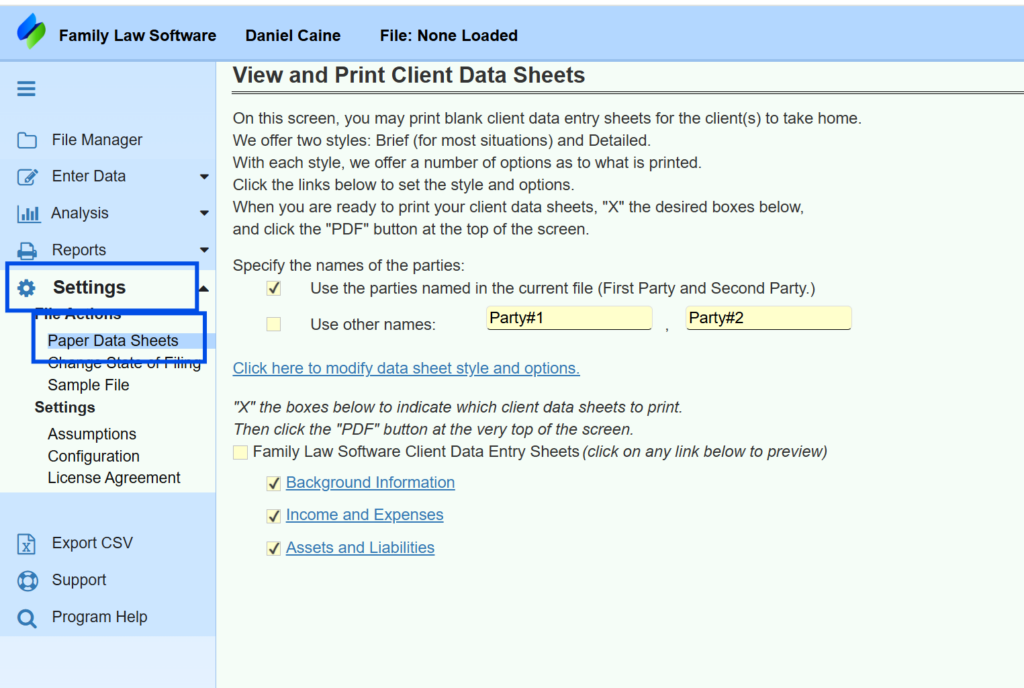
In the desktop, they are on the Files & Settings > Paper Data Sheets.
Cloud Edition questions
If you are having trouble logging in, please try the following:
- If you are an attorney or financial professional, and you do not know your password, go to the login screen at pro.flsgo.com and click Forgot Password.
- If you are a client, go to client.flsgo.com and click Forgot Password.
- If that is not the issue, then, at the login screen, try entering your email address in all lower-case letters.
- If that does not work, please Contact Us. Let us know your email address and whether you are a professional, client, or individual.
Connecticut
If your client lives in Connecticut but works in New York, you can specify that as follows.
- Go to the Parties & Children screen.
- Specify Connecticut as the state where the party lives.
- Click the “more info” button, and specify New York as the state where the party works.
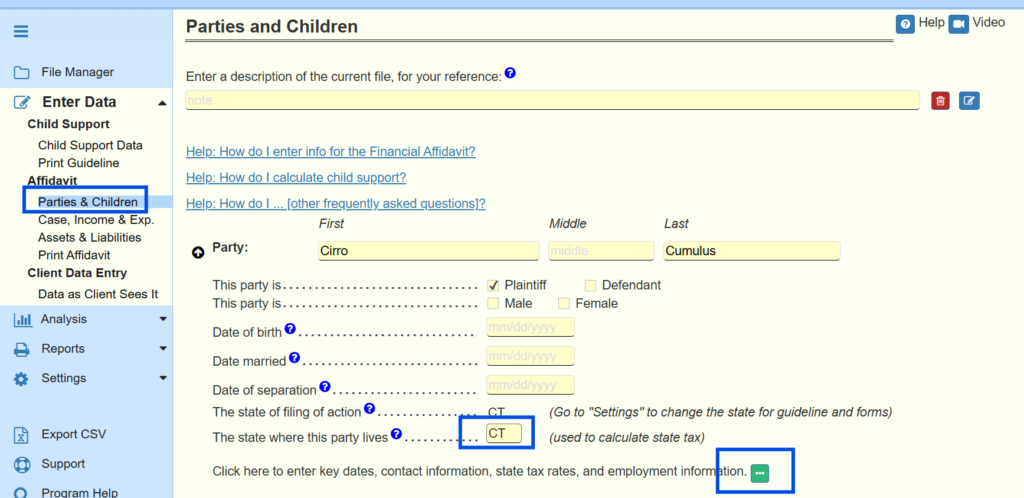
- If appropriate, also click the checkbox for New York City.
- Fill in the boxes about nonresident income.
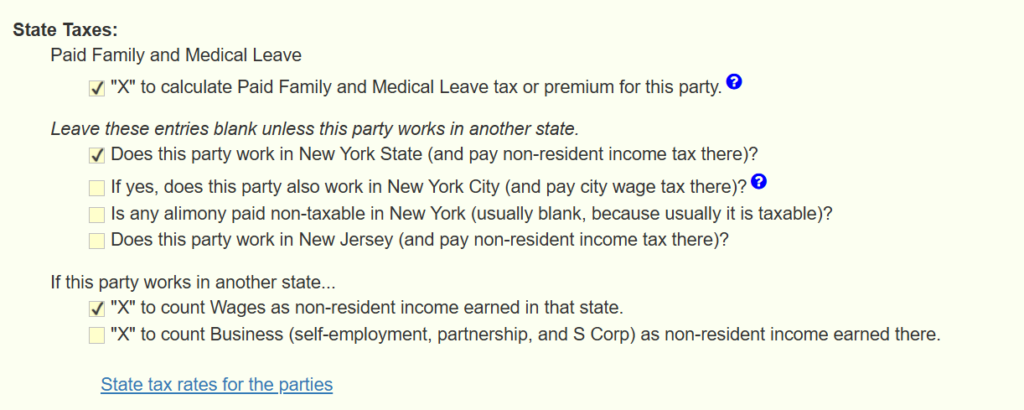
The software will then calculate taxes appropriately.
You will see the detail on the report for state income taxes.
To see that report, go to the View/Edit Taxes report, scroll to the bottom, and click “more info” on the line for state taxes.
Data Entry General Questions
We are not aware of any state in which there is a formula for this.
One approach would be the following:
1. Enter the parent parties’ incomes and the children.
2. Set custody with the first party, with the actual # of overnights that the 2nd party has assigned to 2nd party.
3. This would give the 2nd party’s child support obligation to 3rd party.
4. Now set custody of the children with the 2nd party, with the actual # of overnights that the 1st party has assigned to 1st party.
5. This would give the 1st party’s child support obligation to 3rd party.
We are sure that there are other ways to think about this situation, but this proposal is one of them.
In general, a party must live in a residence in order to claim the mortgage deduction for it.
For more information, see IRS publications 504 and 936. In Publication 936, search for the definition of “qualified home.”
An exception may apply if the title is in joint names and the payer is obligated to pay the mortgage.
Under the tax law, if a property is owned jointly, and the party who pays is obligated to do so, and the payment ceases with the death of the recipient, then any mortgage payment above 50% of the payment counts as an spousal support deduction to the payer and spousal support income to the other party.
The parties must otherwise qualify for spousal support payments between them. For example, this rule will not apply if they live in the same house when the payment is made, or the payment obligation does not cease upon the death of the recipient.
Also, the mortgage interest must be deducted 50% by each party, regardless of who pays the interest.
To take an example, suppose the property is titled jointly and Party A pays 100% of the mortgage, pursuant to an obligation to do so. Half the mortgage payment (100% – 50%) would count as an spousal support deduction to him and spousal support income to Party B or ex-spouse.
Also, Party A would claim half of the interest payment as a mortgage interest payment on the tax return, and Party B would claim the other half on Party B’s tax return.
To Party B, who did not actually make a payment, there would be taxable spousal support income, partially offset by a tax deduction of the mortgage interest.
The mortgage payer (Party A in our example) will usually be better off than before, because of the spousal support deduction.
The party who did not actually pay the mortgage (Party B in our example) will end up worse off, because of the spousal support income.
Under the law, this rule would apply in many cases where parties are getting divorced but still own the home in joint title. However, in practice, this rule is largely ignored. In practice, most of the time, the person who pays the mortgage simply claims the deduction.
The software gives you the option to do it either way. If you click “more info” on the real estate asset, and scroll to the place where you are entering mortgage information, then you can click “more info” again.
At the top of that page, you will see a checkbox to “have the mortgage interest for this property deductible per joint title.”
Check this box if the real estate property is held in joint title, and the exception described above applies, and you wish to have the letter of the law apply.
Yes, You can create a custom title for the Marital Property Division report (also known as the Community Property Division report).
At the top of the Marital Property Division report screen, click the link for options.
On the options screen, at the bottom, you can enter the new title.
You can do a similar thing on the Marital and Separate Property report.
Please note that in community property states, these reports are called Community Property Division report and Community and Separate Property Report, respectively.
Generally speaking, the married filing separate status will give the same result, whether filing with the current spouse or a new spouse.
One thing you may have to change is whether to use standard or itemized deductions.
When filing separately, both spouses must do the same thing — either both use the standard deduction, or both itemize.
You want to be sure that the selection of “standard” or “itemized” that you use for the party is the same as that selection for the new spouse.
If a party’s filing status is “Married filing separately,” click Enter Data > Parties & Children, and you will see the link that is highlighted below.
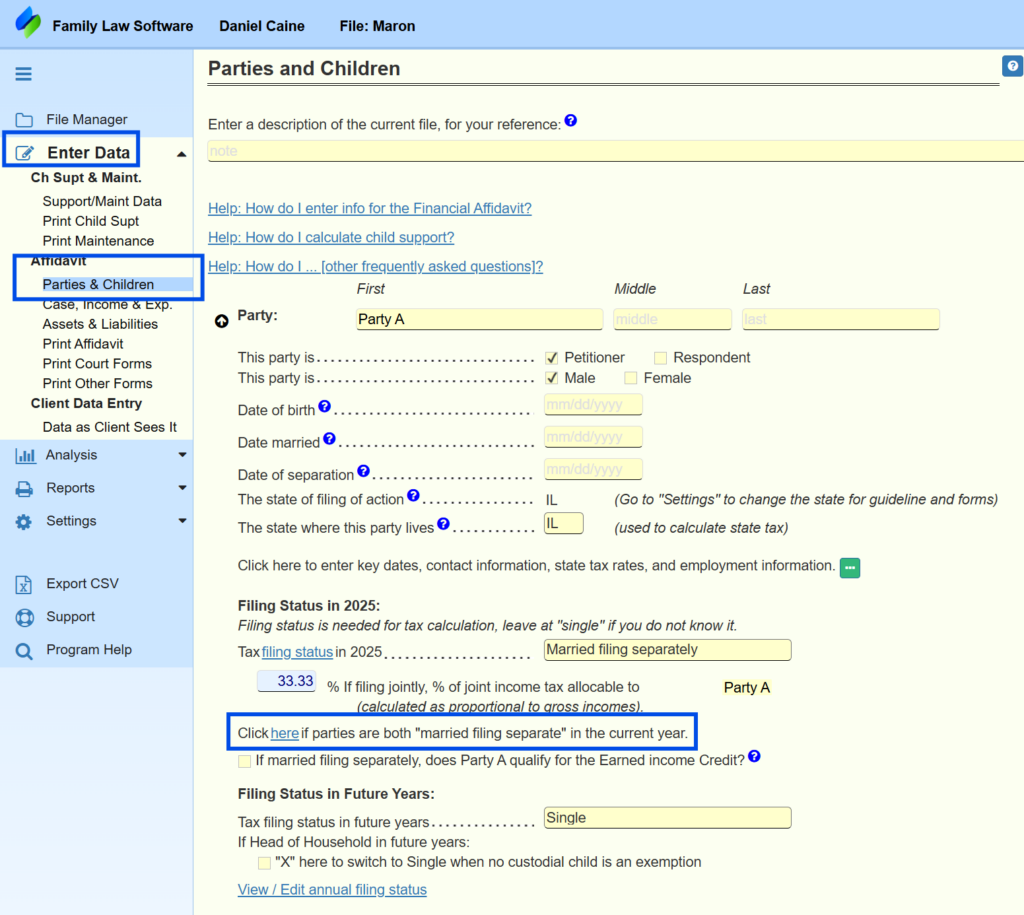
Click the link at “Click here if parties are both ‘married filing separate’ in the current year. You will be taken to the screen shown below.
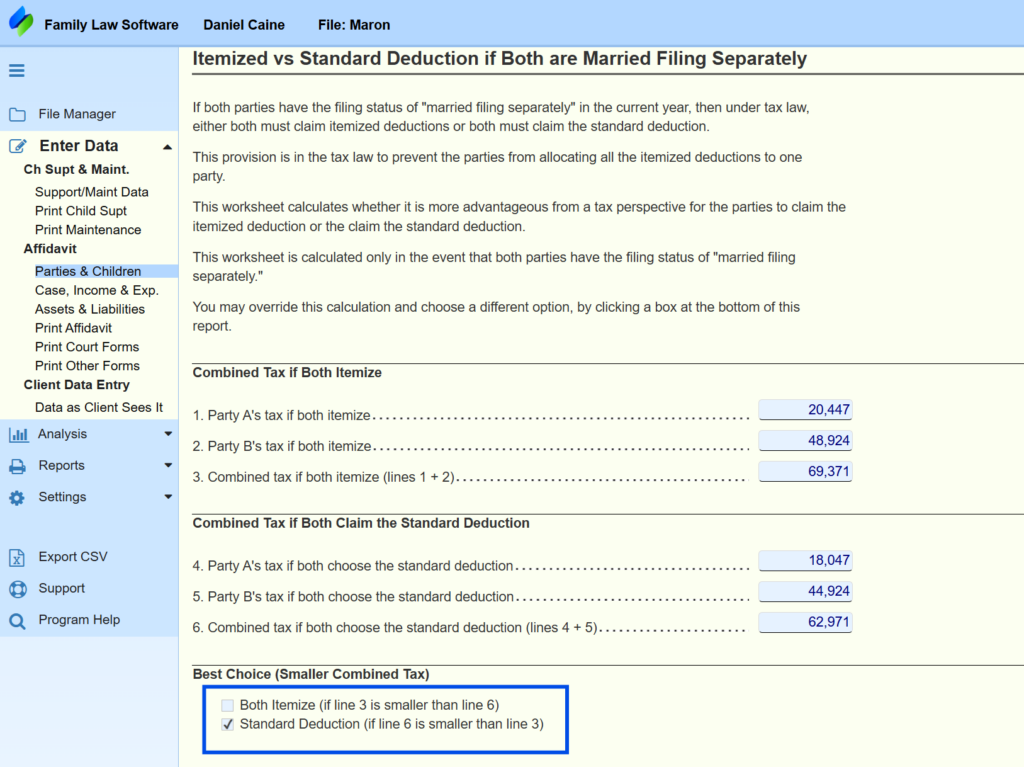
At the bottom of that screen is the place where you choose whether to use the standard or itemized deduction.
The software is assuming that the party is filing separately with the current spouse, and it automatically calculates which is better. To do that, it looks at which choice minimizes the total of the two parties’ taxes.
Because the party will be filing separately with a new spouse, you may need to override this calculation, to indicate whether the party will be using the standard deduction or itemizing.
Getting Going
When you are starting the software, if you get the message saying “Family Law Software has encountered a problem and needs to close,” it is because a file did not download completely or has become corrupted.
Just download the software again, starting at the link below, and you should be fine.
Download Professional Edition
If this download seems to happen instantaneously (that is, in 3 seconds or less), then the software did not actually download again. You still have the faulty download.
This can happen because your browser is insisting that the software has already been downloaded, and so you could not have wanted to download it again.
In that case, if you restart your computer, that should clear your browser’s memory of having downloaded the software before, and this should enable you to download it again.
As you probably know, downloading is just the first step. In order to complete the installation, you need to run the download. You may be prompted to allow Family Law Software to make changes to the computer.
Click on it, then on our license agreement, Next, Next, and then Finish.
At that point, the software is installed and you should be good to go.
If you have the Firm Edition of the software, you can retrieve the files of a former attorney, or an an attorney or other professional who has left the firm.
Here’s how:
Log in to the software.
Open the File Manager (top right).
At the top of File Manager, click “Case Files of Other Pro” as shown below.
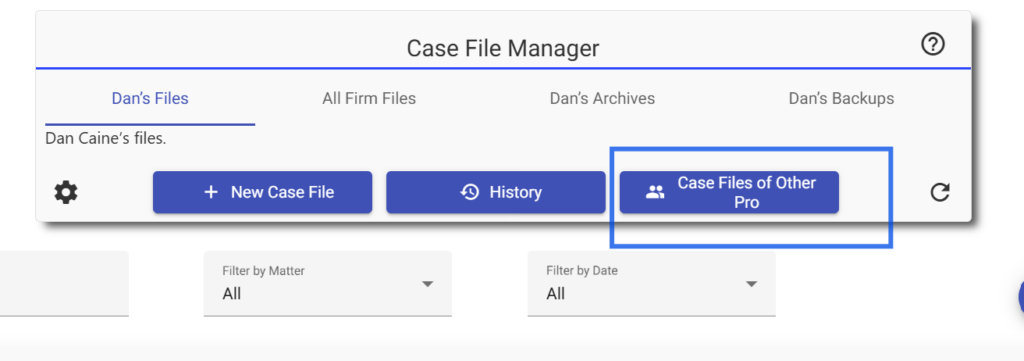
In the dialog that appears, click the checkbox to include files of ex-associates, as shown below.
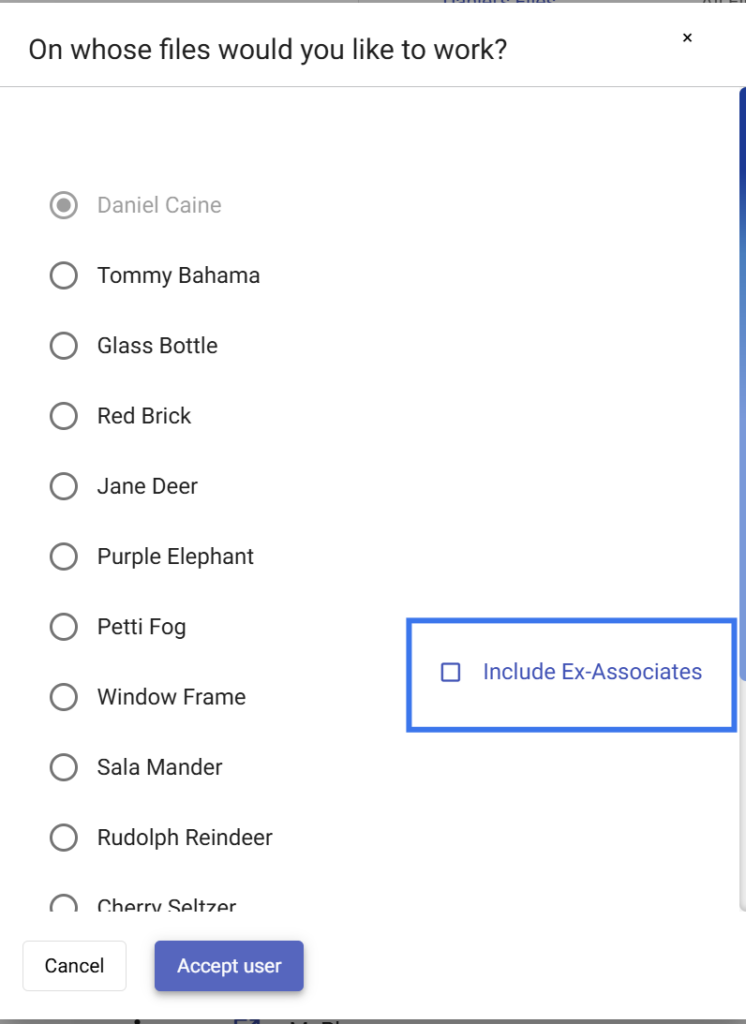
The names of former associates will then be included in the list, and you will be able to open their files.
How Do I Enter ...?
If one of the parties files a nonresident return for a second state, there typically is no adjustment you need to make.
This is because the resident state typically allows a credit for the tax paid to the nonresident state, limited to the amount of tax that would apply to that income in the resident state.
So, in most cases, there is nothing you need to do to reflect tax paid to another state.
The software does have special handling for the following situations:
- Party lives in Connecticut and works in New York
- Party lives in Connecticut and works in New Jersey.
- Party lives in New York and works in New Jersey.
- Party lives in New York and works in Connecticut.
- Party lives in New Jersey and works in New York.
- Party lives in New Jersey and works in Connecticut
If one of these special situations applies, do the following:
If your client lives in Connecticut but works in New York, you can specify that as follows.
- On the Parties & Children screen, specify the state where the party lives.
- Click the “more info” button, and specify the state where the party works.
- If appropriate, also click the checkbox for New York City.
- Fill in the boxes about nonresident income.
The software will then calculate taxes appropriately.
You will see the detail on the report for state income taxes.
To see that report, go to the View/Edit Taxes report, scroll to the bottom, and click “more info” on the line for state taxes.
For states other than these, there is a credit for taxes paid to another state.
- If taxes are higher where the client lives than where the client works, then there is no need to do anything special, because the tax will be the same as if the client worked in-state.
- If taxes are higher where the client works than where the client lives, you will need to override to show the impact of the tax paid to the state where they work. This is because the tax paid to the state where they work will be more than the credit given by the state where they live.
- Some states have reciprocity, where there is no impact of working in a different state. For more information, search for “state income tax reciprocity agreements.”
Investment
You can not specify a fixed-dollar reinvestment in specific investments.
Here is why:
The software is concerned with overall cash flows.
Any positive net cash flow in a given year will be put into the Accumulated Savings account.
The Accumulated Savings account is invested in a hypothetical diversified portfolio. You can see and change the allocation of that portfolio on the Assumptions screen (on the Settings tab).
It would increase the complexity of the software to allow the specification of some amount of that net positive cash flow to go into specified accounts.
We would need data entries to specify the amount, and then there would have to be some way of specifying a priority order if there were not enough net positive cash flow to go around.
Then we would have to complicate the reports, the Accumulated Savings Report in particular, to explain what is happening.
We feel that, given the existing detail in the software’s attempts to capture real world cash flows, including tax effects, that the software is sufficiently complex as it stands.
And the Accumulated Savings report, in particular, is already quite complicated.
So we have resisted adding this additional level of complexity.
Pension
Currently, we calculate defined benefit pension valuations for single lives only.
Typically, the survivor piece is not worth all that much, because:
- It begins to run far in the future, at which point the discounting to the present is substantial; and
- It typically runs only for a few years, from the time the participant dies until the time the survivor dies; and
- If the participant is female and the survivor is male, the likelihood is that there will not be any survivor benefit at all, since on average women live longer than men.
One way you could roughly approximate the value of the survivorship pension is to create a second pension, as follows:
- Make the survivor be the owner of the second pension.
- Have the retirement age be the age the survivor will be when, according to your best guess, the participant will die.
- Set the various date entries so that the coverture fraction is 100% (that is, have the pension start date be after the marriage date, and select the first option, “cut-off date,” for “participant has to work until what date…”).
That will give you a rough guess, at least, as to the value of the survivor benefit.
You can try changing the “retirement age,” to see the impact of different dates that the survivor pension might begin paying on the value of the survivorship piece.
Printing
If you are creating a PDF you may not save it to a Clio matters folder.
When you save it to a Clio matters folder, Clio appends an extension that ends “swap.”
This is no longer a PDF document that can be printed by a PDF reader.
To resolve this problem specify a folder on your desktop, not in Clio.
Real Estate
In general, a party must live in a residence in order to claim the mortgage deduction for it.
For more information, see IRS publications 504 and 936. In Publication 936, search for the definition of “qualified home.”
An exception may apply if the title is in joint names and the payer is obligated to pay the mortgage.
Under the tax law, if a property is owned jointly, and the party who pays is obligated to do so, and the payment ceases with the death of the recipient, then any mortgage payment above 50% of the payment counts as an spousal support deduction to the payer and spousal support income to the other party.
The parties must otherwise qualify for spousal support payments between them. For example, this rule will not apply if they live in the same house when the payment is made, or the payment obligation does not cease upon the death of the recipient.
Also, the mortgage interest must be deducted 50% by each party, regardless of who pays the interest.
To take an example, suppose the property is titled jointly and Party A pays 100% of the mortgage, pursuant to an obligation to do so. Half the mortgage payment (100% – 50%) would count as an spousal support deduction to him and spousal support income to Party B or ex-spouse.
Also, Party A would claim half of the interest payment as a mortgage interest payment on the tax return, and Party B would claim the other half on Party B’s tax return.
To Party B, who did not actually make a payment, there would be taxable spousal support income, partially offset by a tax deduction of the mortgage interest.
The mortgage payer (Party A in our example) will usually be better off than before, because of the spousal support deduction.
The party who did not actually pay the mortgage (Party B in our example) will end up worse off, because of the spousal support income.
Under the law, this rule would apply in many cases where parties are getting divorced but still own the home in joint title. However, in practice, this rule is largely ignored. In practice, most of the time, the person who pays the mortgage simply claims the deduction.
The software gives you the option to do it either way. If you click “more info” on the real estate asset, and scroll to the place where you are entering mortgage information, then you can click “more info” again.
At the top of that page, you will see a checkbox to “have the mortgage interest for this property deductible per joint title.”
Check this box if the real estate property is held in joint title, and the exception described above applies, and you wish to have the letter of the law apply.
Reports
Unfortunately, we can not change the fonts or margins in Family Law Software documents.
This is because many of our documents require fitting in a specific way on an 8 1/2 x 11″ piece of paper.
For consistency, we have written all of our documents using a style to do that.
Each document is laid out with fixed spacing, based on the size of the fonts
This does not lend itself to re-sizing the document borders or re-wrapping the text.
For better or worse, we are not using a Word Processing or Web-based approach, where you can resize borders and the words will wrap to fit.
Our documents are specifically coded to fit 8 1/2″ x 11″ paper, with the Arial typeface we use.
Yes, You can create a custom title for the Marital Property Division report (also known as the Community Property Division report).
At the top of the Marital Property Division report screen, click the link for options.
On the options screen, at the bottom, you can enter the new title.
You can do a similar thing on the Marital and Separate Property report.
Please note that in community property states, these reports are called Community Property Division report and Community and Separate Property Report, respectively.
Trial and Order
We can give you a receipt if you pay for a full year, but we are not set up to send receipts for the regular monthly billing.
The charge on your credit card statement will serve as your receipt.
Yes, we have a Macintosh version of the software.
It runs natively — no need for Parallels or other Windows emulation.
You may open on your Macintosh files you created on Windows, and vice versa.
And you may upload and download between the Mac version and the Cloud.
We do offer the option of charging monthly, and you may cancel your subscription at any time, but we do not support “suspending”a subscription.
The reason for this is that it would not be viable for us, either economically or administratively, because many people would call us to suspend when they have a dry month, then call again to resume when they have a busy month.
The set-up fee is $99, which is 1-2 months’ subscription charges.
If you know that you will not be using the software for more than two months, you may cancel, and then resume later and pay the one-tine charge again.
We do not encourage this, as we will incur the administrative costs of suspending and resuming the subscriptions if you do that.
But we do allow it.
We thank you for your understanding in this regard.
Uncategorized
When the software starts, you have the option to either have the last file load automatically or to open to the File Manager.
You specify this option in the File Manager on the Settings gear as shown below.
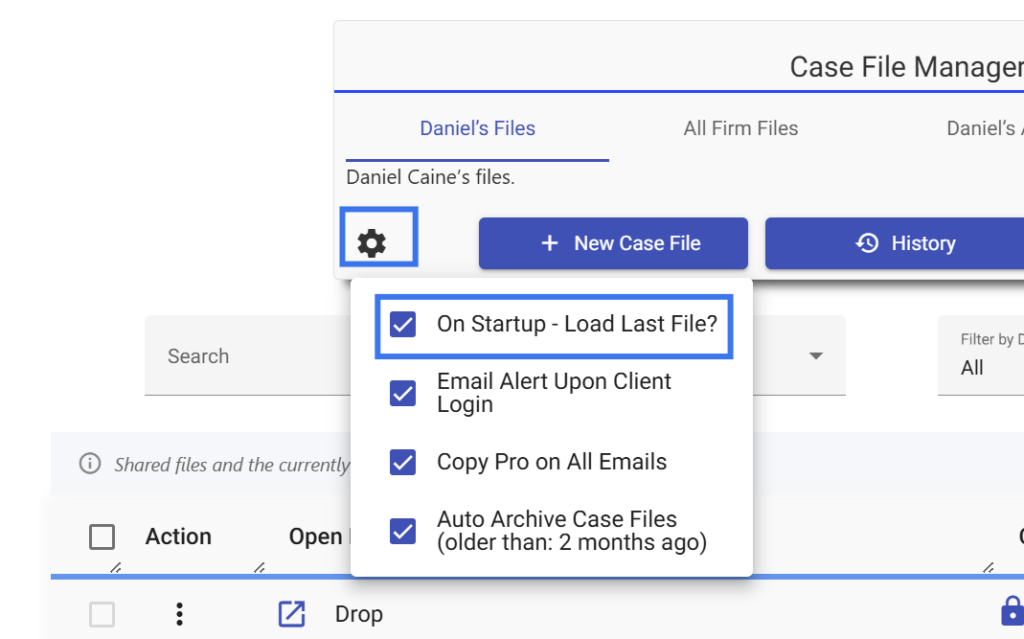
If this option is checked, then, when you open the program, the last file you were working on will open up.
If this option is cleared, then, when you open the program, you will open directly into the File Manager and be able to select the file you want.